
The current base styling stack for the Cyber Terminal frontend is tailwindcss, plus daisyUI, plus a thin internal wrapper layer of my own called RxUI. It works well enough. One thing I like about daisyUI is its design philosophy: pure CSS, no JavaScript mixed in. I generally trust CSS-only UI a bit more than UI that has JavaScript glued into every corner. But CSS is still not as powerful as JavaScript. It is, in the end, a static layout system, and that leads to a whole pile of UX issues.
Take a simple popup as an example. In daisyUI, the basic approach is to use an element’s focus state together with CSS selectors to show the popup content. At first glance that sounds perfectly aligned with the design philosophy, but in practice it causes a bunch of trouble. To keep the popup element loaded and ready, the hidden state uses visibility: hidden instead of display: none. That means the popup still occupies real layout space even when it is not visible, which can throw layouts off in surprising ways.
For example, suppose I want a scrollable Table component. Every column includes several action buttons, and dangerous actions such as delete use a confirmation popup. That is where things get weird. Because the hidden popup still takes up space, the popup in the last column extends downward even while hidden. Once the user scrolls all the way to the last column, the table can still scroll farther down for no good reason. It looks ridiculous.
And that is not the only problem. CSS also has no real notion of floating layout intelligence here; an element cannot inspect the visible boundary and reposition itself accordingly. The Table component is scrollable by default, so its internal overflow behavior ends up being clip, which means an overflowing dialog gets clipped along with everything else. That does not only affect dialogs. Tooltips end up looking like this too:
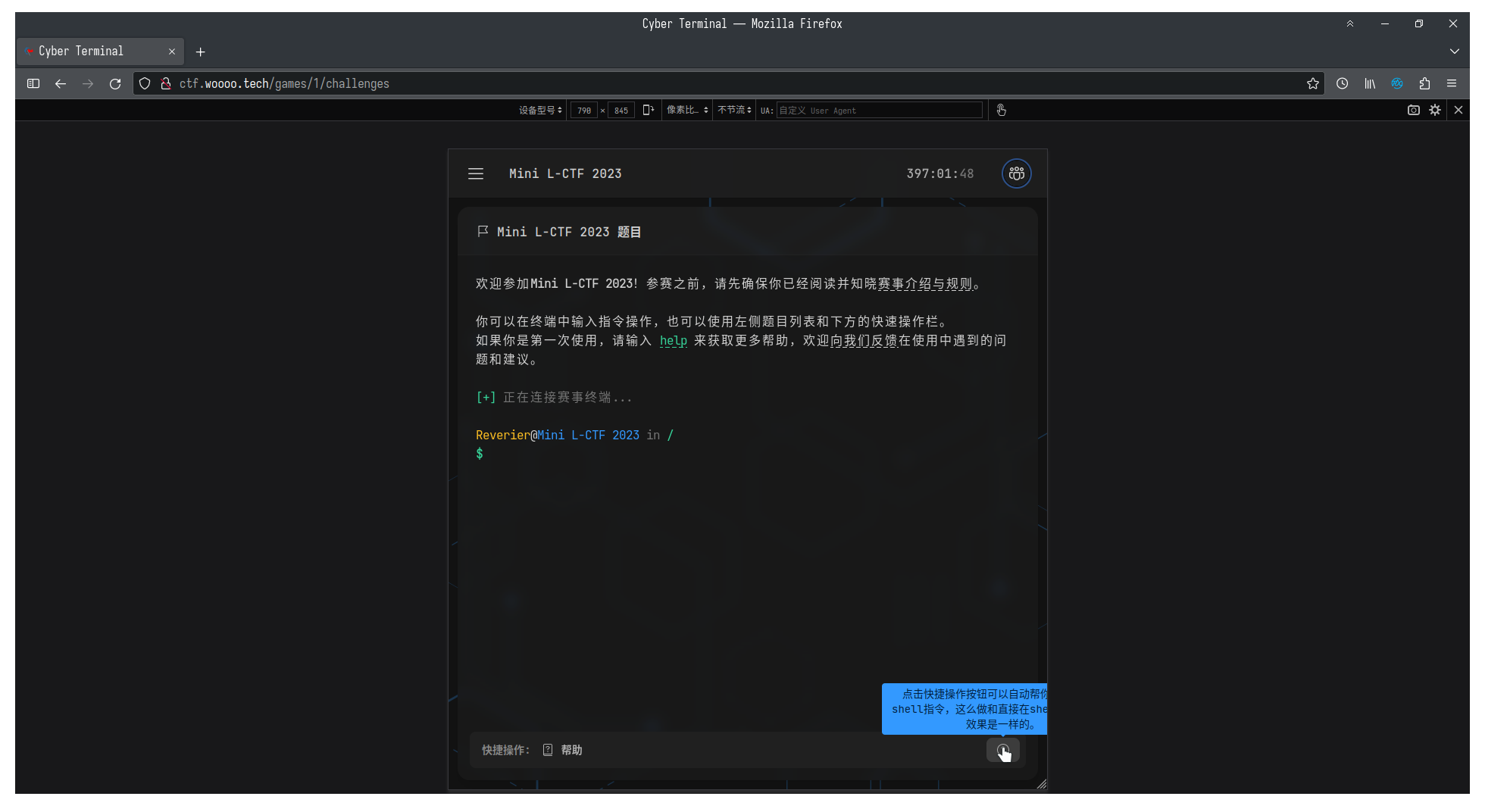
Sure, almost nobody is solving a CTF on a screen with exactly that unlucky width. But the behavior is still silly. While writing the UI I had to keep thinking about popup placement all the time: place it on the left and it overflows, place it on the right and it still overflows, place it below and good news, it no longer overflows - bad news, it stretches the scrollbar instead…

So I started digging for a better solution and eventually found Microsoft’s Fluent UI design video. Their final choice was popper.js for popover-style components. But there was one annoying detail: the integrations I found were really solid only on the React side, while the third-party Vue integrations I tried were no longer especially convincing.
So I wrote my own.
In the end I chose Floating UI and wrapped it in a lightweight way around Svelte’s lifecycle. The relevant API surface is basically this:
import {
computePosition,
autoUpdate,
offset,
shift,
flip,
} from "@floating-ui/dom";
/** Placement https://floating-ui.com/docs/computePosition#placement */
export type Direction = "top" | "bottom" | "left" | "right";
export type Placement = Direction | `${Direction}-start` | `${Direction}-end`;
// Options & Middleware
export interface Middleware {
// Required ---
/** Offset middleware settings: https://floating-ui.com/docs/offset */
offset?: number | Record<string, unknown>;
/** Shift middleware settings: https://floating-ui.com/docs/shift */
shift?: Record<string, unknown>;
/** Flip middleware settings: https://floating-ui.com/docs/flip */
flip?: Record<string, unknown>;
// Optional ---
/** Size middleware settings: https://floating-ui.com/docs/size */
size?: Record<string, unknown>;
/** Auto Placement middleware settings: https://floating-ui.com/docs/autoPlacement */
autoPlacement?: Record<string, unknown>;
/** Hide middleware settings: https://floating-ui.com/docs/hide */
hide?: Record<string, unknown>;
/** Inline middleware settings: https://floating-ui.com/docs/inline */
inline?: Record<string, unknown>;
}
export interface PopupSettings {
/** Provide the event type. */
event: "click" | "hover" | "focus-blur" | "focus-click";
/** Match the popup data value `data-popup="targetNameHere"` */
target: string;
/** Set the placement position. Defaults 'bottom'. */
placement?: Placement;
/** Query elements that close the popup when clicked. Defaults `'a[href], button'`. */
closeQuery?: string;
/** Optional callback function that reports state change. */
state?: (event: { state: boolean }) => void;
/** Provide Floating UI middleware settings. */
middleware?: Middleware;
}
export function popup(triggerNode: HTMLElement, args: PopupSettings) {
// Local State
const popupState = {
open: false,
// eslint-disable-next-line @typescript-eslint/no-empty-function
autoUpdateCleanup: () => {},
};
const focusableAllowedList =
':is(a[href], button, input, textarea, select, details, [tabindex]):not([tabindex="-1"])';
let focusablePopupElements: HTMLElement[];
// Elements
let elemPopup: HTMLElement;
function setDomElements(): void {
elemPopup =
document.querySelector(`[data-popup="${args.target}"]`) ??
document.createElement("div");
Object.assign(elemPopup.style, {
position: "absolute",
opacity: "0",
top: "0",
left: "0",
scale: "0.95",
display: "none",
});
elemPopup.classList.add("transition-all", "duration-100", "ease-in-out");
}
setDomElements(); // init
// Render Floating UI Popup
function render(): void {
// Error handling for required Floating UI modules
if (!elemPopup)
throw new Error(`The data-popup="${args.target}" element was not found.`);
if (!computePosition)
throw new Error(
`Floating UI 'computePosition' not found for data-popup="${args.target}".`,
);
if (!offset)
throw new Error(
`Floating UI 'offset' not found for data-popup="${args.target}".`,
);
if (!shift)
throw new Error(
`Floating UI 'shift' not found for data-popup="${args.target}".`,
);
if (!flip)
throw new Error(
`Floating UI 'flip' not found for data-popup="${args.target}".`,
);
// Floating UI Compute Position
// https://floating-ui.com/docs/computePosition
computePosition(triggerNode, elemPopup, {
placement: args.placement ?? "bottom",
// Middleware - NOTE: the order matters:
// https://floating-ui.com/docs/middleware#ordering
middleware: [
// https://floating-ui.com/docs/offset
offset(args.middleware?.offset ?? 8),
// https://floating-ui.com/docs/shift
shift(args.middleware?.shift ?? { padding: 8 }),
// https://floating-ui.com/docs/flip
flip(args.middleware?.flip),
],
}).then(({ x, y }) => {
Object.assign(elemPopup.style, {
left: `${x}px`,
top: `${y}px`,
});
});
}
// State Handlers
function open(): void {
if (!elemPopup) return;
// Set open state to on
popupState.open = true;
// Return the current state
if (args.state) args.state({ state: popupState.open });
// Update render settings
render();
// Update the DOM
elemPopup.style.display = "block";
setTimeout(() => {
elemPopup.style.opacity = "1";
elemPopup.style.scale = "1";
}, 10);
elemPopup.style.pointerEvents = "auto";
// Trigger Floating UI autoUpdate (open only)
// https://floating-ui.com/docs/autoUpdate
popupState.autoUpdateCleanup = autoUpdate(triggerNode, elemPopup, render);
// Focus the first focusable element within the popup
focusablePopupElements = Array.from(
elemPopup?.querySelectorAll(focusableAllowedList),
);
}
function close(callback?: () => void): void {
if (!elemPopup) return;
// Set transition duration
const cssTransitionDuration =
parseFloat(
window.getComputedStyle(elemPopup).transitionDuration.replace("s", ""),
) * 1000;
// Set open state to off
popupState.open = false;
// Return the current state
if (args.state) args.state({ state: popupState.open });
// Update the DOM
elemPopup.style.opacity = "0";
elemPopup.style.scale = "0.95";
setTimeout(() => {
elemPopup.style.display = "none";
}, cssTransitionDuration);
elemPopup.style.pointerEvents = "none";
// Cleanup Floating UI autoUpdate (close only)
if (popupState.autoUpdateCleanup) popupState.autoUpdateCleanup();
// Trigger callback
if (callback) callback();
}
// Event Handlers
function toggle(): void {
popupState.open === false ? open() : close();
}
function onWindowClick(event: Event): void {
// Return if the popup is not yet open
if (popupState.open === false) return;
// Return if click is the trigger element
if (triggerNode.contains(event.target as Node)) return;
// If click it outside the popup
if (elemPopup && elemPopup.contains(event.target as Node) === false) {
close();
return;
}
// Handle Close Query State
const closeQueryString: string =
args.closeQuery === undefined ? "a[href], button" : args.closeQuery;
const closableMenuElements = elemPopup?.querySelectorAll(closeQueryString);
closableMenuElements?.forEach((elem) => {
if (elem.contains(event.target as Node)) close();
});
}
// Keyboard Interactions for A11y
const onWindowKeyDown = (event: KeyboardEvent): void => {
if (popupState.open === false) return;
// Handle keys
const key: string = event.key;
// On Esc key
if (key === "Escape") {
event.preventDefault();
triggerNode.focus();
close();
return;
}
// On Tab or ArrowDown key
const triggerMenuFocused: boolean =
popupState.open && document.activeElement === triggerNode;
if (
triggerMenuFocused &&
(key === "ArrowDown" || key === "Tab") &&
focusableAllowedList.length > 0 &&
focusablePopupElements.length > 0
) {
event.preventDefault();
focusablePopupElements[0].focus();
}
};
// Event Listeners
switch (args.event) {
case "click":
triggerNode.addEventListener("click", toggle, true);
window.addEventListener("click", onWindowClick, true);
break;
case "hover":
triggerNode.addEventListener("mouseover", open, true);
triggerNode.addEventListener("mouseleave", () => close(), true);
break;
case "focus-blur":
triggerNode.addEventListener("focus", toggle, true);
triggerNode.addEventListener("blur", () => close(), true);
break;
case "focus-click":
triggerNode.addEventListener("focus", open, true);
window.addEventListener("click", onWindowClick, true);
break;
default:
throw new Error(`Event value of '${args.event}' is not supported.`);
}
window.addEventListener("keydown", onWindowKeyDown, true);
// Render popup on initialization
render();
// Lifecycle
return {
update(newArgs: PopupSettings) {
close(() => {
args = newArgs;
render();
setDomElements();
});
},
destroy() {
// Trigger Events
triggerNode.removeEventListener("click", toggle, true);
triggerNode.removeEventListener("mouseover", open, true);
triggerNode.removeEventListener("mouseleave", () => close(), true);
triggerNode.removeEventListener("focus", toggle, true);
triggerNode.removeEventListener("focus", open, true);
triggerNode.removeEventListener("blur", () => close(), true);
// Window Events
window.removeEventListener("click", onWindowClick, true);
window.removeEventListener("keydown", onWindowKeyDown, true);
},
};
}